


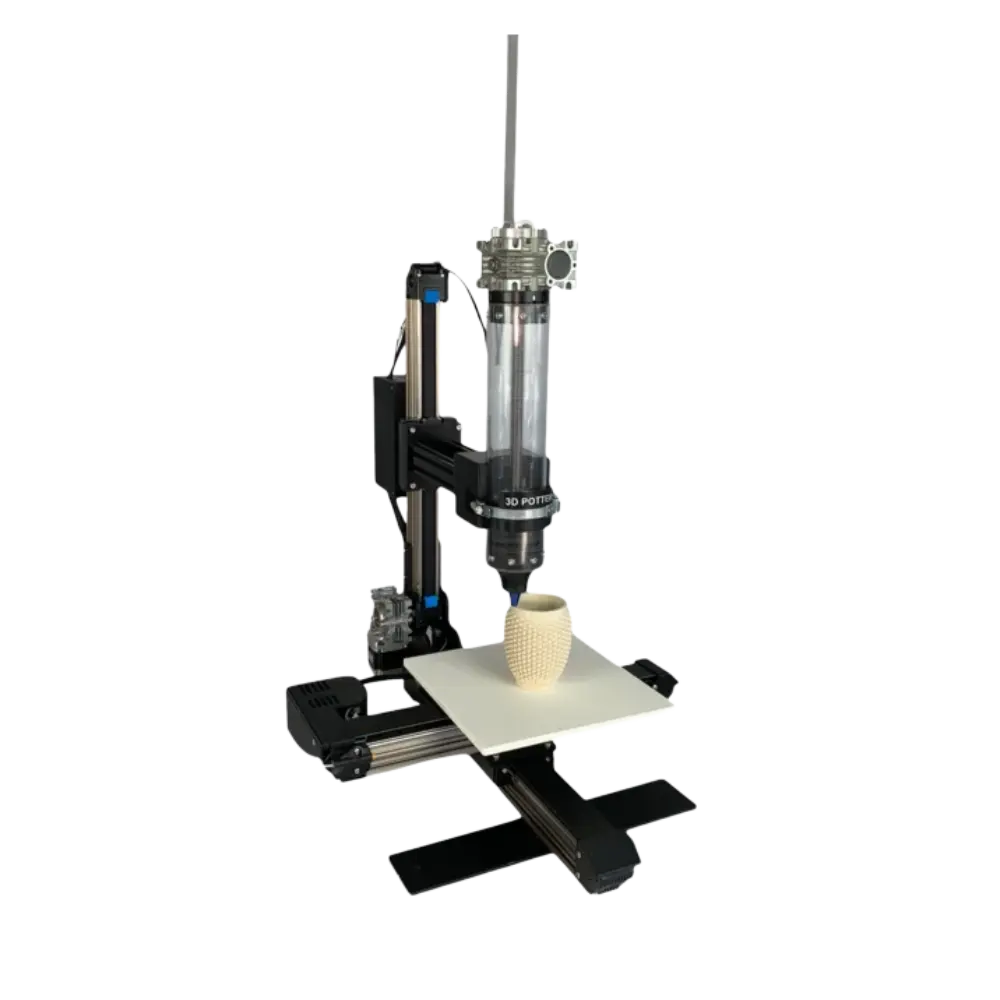
Clay 3D Printer
Clay 3D Printer by WolfPack 3DCP The Clay 3D Printer by WolfPack 3DCP is engineered to transform the way artists, designers, and manufacturers create ceramic structures. […]
Free Shipping on Orders Over $20000
Bundle Deals
Loyalty Program
Clay 3D Printer by WolfPack 3DCP
The Clay 3D Printer by WolfPack 3DCP is engineered to transform the way artists, designers, and manufacturers create ceramic structures. Built with precision mechanics and intelligent extrusion control, this powerful ceramic 3D printing machine delivers consistent results for both creative studios and production facilities. Whether you are crafting decorative pottery or architectural components, this industrial clay 3D printer offers the reliability and performance modern professionals demand.
Precision Engineering for Professional Results
Designed for versatility, the Clay 3D Printer functions as a high-precision 3D printer for clay sculpting, enabling smooth layer deposition and intricate detailing. Its reinforced frame, advanced motor system, and optimized nozzle design ensure steady material flow and reduced vibration during printing. As a professional ceramic 3D printer, it supports complex geometries, allowing users to move beyond traditional hand-building limitations and into digital fabrication.
Built for Industrial and Creative Applications
WolfPack 3DCP has developed this ceramic 3D printing machine with both scalability and durability in mind. The industrial clay 3D printer is suitable for workshops, universities, research labs, and commercial ceramic production units. With customizable extrusion systems and adjustable print parameters, the Clay 3D Printer adapts to various clay bodies and viscosity levels. This flexibility makes it an ideal 3D printer for clay sculpting large-scale installations as well as delicate artistic forms.
High Performance Meets Reliability
Performance is where the Clay 3D Printer truly stands out. The precision-guided rails and high-torque motors ensure stable motion control, which is critical for any ceramic 3D printing machine operating in demanding environments. As an industrial clay 3D printer, it is built to handle continuous workflows while maintaining dimensional accuracy. For creators seeking a professional ceramic 3D printer that merges craftsmanship with automation, WolfPack 3DCP delivers a solution that balances innovation with usability.
User-Friendly Operation and Creative Freedom
Ease of operation is another defining advantage. The intuitive control interface simplifies setup and calibration, allowing users to focus on design rather than troubleshooting. This advanced 3D printer for clay sculpting streamlines production time while maintaining artistic freedom. From functional ceramics to experimental art pieces, the Clay 3D Printer empowers makers to push boundaries. When investing in a ceramic 3D printing machine from WolfPack 3DCP, you are choosing an industrial clay 3D printer and professional ceramic 3D printer designed for long-term performance, efficiency, and creative excellence.
Technical Specifications:
- Build Volume: 10” x 10” x 12” (X/Y/Z)
- Printer Size: 30” L x 21” W x 28” H
- Recommended Speed: 30–60 mm/s (1.2”–2.4”/s)
- Max Speed: Up to 130 mm/s (5.1”/s)
- Power: 110–220 VAC, 50/60 Hz
- Weight: 38 lbs with empty extruder
What’s Included:
- 3D PotterBot 10 Micro printer
- 1000ml ceramic extruder
- Two 1000ml polycarbonate tubes
- Four aluminum nozzles (3mm, 4mm, 5mm, 6mm)
- Parts kit (Allen keys, grease, driver tool, extra screws)
- Power supply
Software requirements
The only requirement for machine control is a web browser interface. For object generation, the 3D PotterBot 10 Micro is similar to other 3D printer as it requires an STL file to be sliced by a third-party program. We recommend using Simplify3D. Then transfer the file onto the printer’s SD card via WiFi.
FAQ'S About 3s clay Printer
Lorem ipsum dolor sit amet, consectetur adipiscing elit. Ut elit tellus, luctus nec ullamcorper mattis, pulvinar dapibus leo.
What is a 3D printer?
A 3D printer is a machine that can make real objects from a computer design. It builds things layer by layer using materials like plastic. Think of it like a magic machine that can turn your digital drawing into a real toy or tool!
How does a 3D printer work?
A 3D printer works like following a recipe. First, you make a design on a computer. Then, the printer adds material layer by layer until the object is complete. It’s like stacking tiny blocks to make something cool!
Can anyone use a 3D printer?
Yes! Anyone can use a 3D printer. Some printers are easy to use, and there are lots of online guides to help you. Kids, teens, and adults can all learn to make fun things with a little practice.
What materials are used in 3D printing?
Most 3D printers use plastic, like PLA or ABS. Some printers can even use metal, clay, or other special materials. You just pick the material depending on what you want to make.
What are the benefits of having a 3D printer?
With a 3D printer, you can make your own toys, decorations, or tools at home. It’s a fun way to bring your ideas to life and learn about technology at the same time.
How much do 3D printers cost?
3D printers can cost different amounts. Small beginner ones can be a few hundred dollars, and big, advanced ones can cost thousands. It depends on what you need it for.
What can I make with a 3D printer?
You can make almost anything! Toys, art, decorations, tools, or even parts for bigger projects. If you can imagine it, you can try to print it.
Is it safe to use a 3D printer?
Yes, 3D printers are safe if you follow the rules. They can get hot, so always watch them while they work. Kids should get help from an adult, especially when setting it up or changing materials.
What should I do if my 3D print doesn't turn out?
If your print doesn’t look right, don’t worry! Check the steps and printer settings. Mistakes are normal and help you learn how to make it better next time.
Where can I learn more about 3D printing?
You can watch videos, take online tutorials, or join workshops at libraries or makerspaces. There are lots of free ways to learn, and it can be really fun!
Reviews
There are no reviews yet.